Showing posts with label android app. Show all posts

25 May 2013

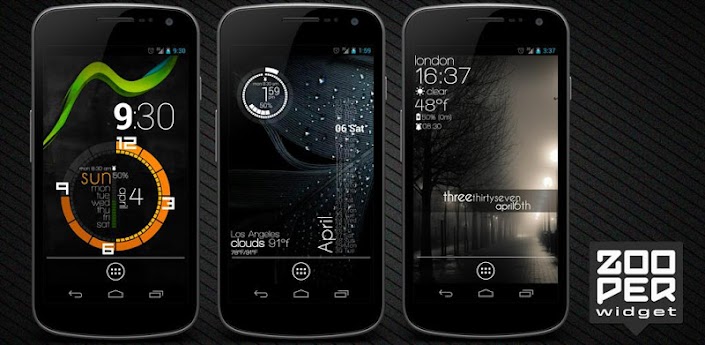
Zooper Widget Pro


Zooper Widget Pro


Minimal, classy, extremely customizable and battery friendly "do it yourself" Widget with almost limitless possibilities!

If you like the software and want to support the development please rate it! If you have issues or requests send me an email or use the forum at http://zooper.org/wp/forums/
There is some KNOWN ISSUE on GALAXY S2 devices, checkhttp://zooper.org/wp/archives/1457
FREE FEATURES
- Sample templates included, no need to download anything else
- Some custom fonts already included, additional can be added on sdcard/fonts
- Create your templates easily, no functional limit, tons of variables, WYSIWYG editor
- Build your style and change everything, color, text, shapes, position and more
- Completely customizable date and time (day of the year, week number, number to text...)
- Date calculations (countdown, time to or from any date, calendar event or system attribute)
- Full Math expressions supported (like Star Trek stardate)
- Battery info (remaining time, percentage, temperature, voltage)
- World clock (multiple timezones on the same widget)
- Weather for current or multiple locations on the same widget
- Up to 5 days forecast from multiple providers (Open Weather Map, YR.NO)
- Calendar info with free customization
- System info, like uptime, next alarm, SD card space
- WiFi network name, cell operator, signal strenght, connection type
- Network traffic data stats for current day, week, month and more
- Sunrise, Sunset and Astrological Nautical or Civil twilight
- Moon Rise, Set and Illumination percentage
- Series for days, months and more
- Completely dynamical and customizable TTF and PNG iconsets
- Static Bitmaps (PNG with alpha and JPG)
- Progress Bars customizable with any numeric variable as min/max and value
- Tasker integration (see website)
- Jelly Bean lock screen support
source

21 May 2013

Night Camera+


Night Camera+


Capture high quality images in low light. Use your mobile camera everywhere, in any conditions, no matter how dark is it. Take sharp and noise free images. See the scene clearly with night vision viewfinder.
- No blur, no noise!
- Full resolution
- Advanced low light technique
- Location tagging
- Shutter sound can be muted
- Support for Flash on/off/auto
Night Camera+ is a perfect tool for shooting indoor, at night and evening, in twilight and any other dark environment.
===
"Sorry for the quality, mobile." Almost everyone makes excuses when publishing a photo taken with a camera phone. What are the problems taking good quality pictures with camera phones and is there a way to solve them and bridge the gap between camera phones and compact cameras?
You may think there is very little difference between a cell phone camera and a point-and-shoot camera. Nowadays, mobile phone cameras have enough megapixels. The phones have enough storage capacity. Even the lens quality is not as bad as before and can compete with low-end compact cameras.
At the same time, a big gap still exists when it comes to the basis of photography – the light source. If you take pictures in daylight, you may be satisfied with the quality of mobile images. However, when you move to a less bright indoor environment, you start to notice the difference. Mobile images appear to have more noise, they are usually blurry and lack detail in shadows. Bright areas turn into pure-whte spots. Faces seem unnaturally flat, especially when using a flash. Getting into a darker environment extends the gap. While images taken with a regular camera are not very good but still do show a scene, mobile images become unacceptably blurry and show almost nothing but smeared lights and the camera’s own noise.
Almalence, Inc. has developed a technology that combines a special exposure mode and software post-processing to greatly reduce the blur effects and improve dynamic range.


source :

16 May 2013

Fast Burst Camera

Fast Burst Camera


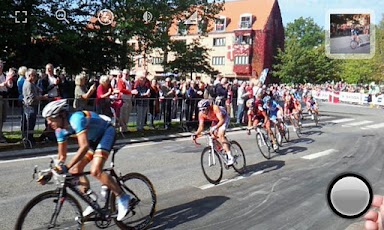
This is the fastest camera app available for Android.
Fast Burst Camera is capable of taking 30 photos per second.
( on low-end devices, 5-10 photos per second is possible )
Hold shoot button for continuous burst, or tap for fast single shots.
Zero shutter lag - pictures are taken as soon as shutter button is pressed.
★ Supports flash, focus and zoom. Shutter sound can be turned of.
★ Shoot modes
- Single shot
- Full Burst
- Pre-shot
- Motion trigger
★ Built-in editor
- Add filters, frames, text and more
- Adjust brigthess and colours
- Create animated GIFS and collages
★ Great for
- sports shots
- pictures of kids or pets
- party camera
- taking a burst of pictures in an important situation, and pick the best later
- analyse your golf swing frame-by-frame
- Parkour shots
★ Tips for good burst photos
- get as much light as possible - especially when capturing things or people in motion
- keep the camera steady
- hold the shoot button for continuous bursts, and pick the good shots later


source :
https://play.google.com/store/apps/details?id=com.spritefish.fastburstcamera&hl=en
direct download link

14 May 2013

LINE: Free Calls & Messages FOR PC WINDOWS 2013 (PORTABLE)

LINE: Free Calls & Messages


There are no limits! Call and message as much as you want!
LINE is a new communication app which allows you to make FREE voice calls and send FREE messages whenever and wherever you are, 24 hours a day!
LINE has more than 150 million users worldwide and is used in over 230 countries!
LINE has been ranked no. 1 in the free app category in 44 countries including Japan, Taiwan, Thailand, Spain, China, Hong Kong, Singapore, Malaysia, Macau, Switzerland, Russia, Saudi Arabia, United Arab Emirates and more!
More about LINE’s Features:
★Free Voice Calls!
All LINE smartphone users can enjoy free high quality voice calls, whenever and wherever you are.
Talk for as much as you want and best of all, it’s free!
★Messages Delivered to you Quick!
Instead of taking time to email/sms your friends, use LINE’s message function to send messages easily with colorful icons, photos and even location information.
・Express yourself using stickers and emoji.
・Send photos and voice messages with ease
・Available for PCs and smart-tablets
★Make it YOUR Social Network
・Have fun with LINE’s ‘Home’ feature: Share your moments with all your friends using photos, videos, and location info.
・Use ‘Timeline’ to see what your friends have been up to and what they have posted! Leave comments, messages and enjoy your communication.
Other LINE Features:
★New Sticker Shop! Find all your favorite characters here!
Hilarious and fun stickers featuring famous characters from all over the world can be found here!
★Get the latest info with LINE Official Accounts
Add these accounts as friends and receive messages from popular celebs and singers, as well as money saving coupons from various businesses.
*As with any other apps, data transfer fees may be incurred. We therefore recommend using the services on an unlimited mobile price plan.
Technical Info for Seamless Usage:
★Android Devices: We recommend installing Android OS 2.1 or higher
Thanks for reading and we hope you enjoy LINE!


direct download link :
direct download, unzip-run Line.exe (no virus)

14 December 2012

Next Launcher


Next Launcher


Next Launcher, designed by GO Dev Team, is officially released now!
At the end of 2012, we have a surprise for you! Next Launcher, designed by GO Dev Team, is officially released now!
Next Launcher is a new launcher application which is full of glorious 3D elements and dynamic effects. Fancy 3D visual elements, gorgeous transition effects and humanized gestures bring you a unique and splendid operation experience and visual enjoyment.
Features:
1. Various operation for icons: icons support rotation, reset, select, align and so on. Operation is easy and fantastic.
2 .Unlimited screen layout: placing icons or widgets randomly which forms your own home screen.
3. Stereoscopic screen preview: lots of screen display effects, dazzling animation of screen switching about adding or deleting screen.
4. Quick screen management: adding different kinds of elements in screen edit including application icons, folders and widgets. It’ll support changing wallpapers and themes soon.
5. Rotatable dock: inverting upward or downward the Dock can quickly switch among home screen, screen edit and screen preview.
6. Powerful app drawer: icons can be arranged by names or by time, and folders can be created by overlaying icons. Batch mode and operation of adding apps to screen are also available.
7. Beautiful scrolling effects: a variety of app drawer scrolling effects that provide a distinctive screen switching experience.
8. Fancy 3D widgets: 3D widgets that are based on Next Launcher are coming soon!
Tips:
1.Please make sure your device has installed Google Play.
2.Phone performance:Android 2.3.3 and up; Dual-core models is better.
3. Suggestion:Watch the video of Next Launcher first, to know about the cool operation of the product.


source
01 November 2012

Adob3® Photosh0p® T0uch v1.2

Adob3® Photosh0p® T0uch v1.2


Transform images with core Photoshop features in an app designed for tablets.
Transform your images with core Adobe Photoshop features in an app designed for tablets.
Combine images, apply professional effects, share results with friends and family through Facebook – all from the convenience of your tablet.
• Use popular Photoshop features designed for the tablet such as layers, selection tools, adjustments, and filters to create mind-blowing images.
• Use your tablet camera to fill an area on a layer with the unique camera fill feature.
• Select part of an image to extract by scribbling with the Scribble Selection tool. With Refine Edge, use your fingertip to capture even hard-to-select image elements, like hair, with ease.
• Work on high-resolution images while maintaining the highest image quality. Supports images up to 12 megapixels.
• Follow step-by-step tutorials to easily learn techniques the pros use for great-looking results.
• Search and acquire images with the integrated Google Image Search.
• Share images on Facebook and view comments right within the app.
• Browse an inspirational gallery for the styles and results you'd like to achieve.
• Sync projects to Adobe Creative Cloud* and open layered files from Adobe Photoshop Touch in Photoshop CS6 and Photoshop CS5.1.
• Free membership to Creative Cloud gives you 2GB of cloud storage plus the ability to sync between tablet and desktop, access files from the web, and easily share with others. Learn more > http://www.adobe.com/products/creativecloud


source
source
mirror apk for fone
mirror apk for tab

09 September 2012

Imap setting yahoomail for android


Simple setting but work for all carrier :

fill complete username xxx@yahoo.com
fill password

Set protocol to IMAP
IMAP server to imap.mail.yahoo.com
Security type none
Server port 143

SMTO server to smtp.mail.yahoo.com
Server port 587
Security type none

server email yahoo

-tested and works charmly on all android email client
-pls try it on yer own gadget and report if works

22 August 2012

Ocean Aquarium 3D: Turtle Isle v1

Ocean Aquarium 3D: Turtle Isle v1

erenity of the ocean meets the colorful world of coral reefs full of life.
"Ocean Aquarium 3D: Turtle Isle" is an interactive Live Wallpaper. Outstanding high quality 3D graphics now available on Android phones & tablet devices!

List of main features. Here we go! ▼

★ Animated ocean;
★ Animated interactive fish, turtles & little crab;
★ Smart control - you can tilt camera up & down to change appearance on the go;
★ Time of day changе (just beautiful);
★ Fully customizable upper and underwater scenery;
★ Various camera modes including zoom up to 1.5x;
★ Power saving system based on direct FPS control;
★ Social Share button and more.

Ocean Aquarium 3D live wallpaper fully supports horizontal orientation and looks amazing on tablet devices as well as on phones.

source
https://play.google.com/store/apps/details?id=com.hotpies.turtleisle
mirror

20 August 2012

Nexus7 jellybean LiveWallpaper

Nexus7 jellybean LiveWallpaper

Nexus 7 live wallpaper show soft blurred light on the new android jelly bean background.
The glow of light move and merge to create a magical and beautiful effect.
set it as live wallpaper:
Home -> Menu -> Wallpapers -> Live Wallpapers

source
https://play.google.com/store/apps/details?id=com.eightsoft.JellyBean
mirror

17 August 2012

Kingsoft Office

Kingsoft Office

All is FREE! Allow you View & Edit Office files Anywhere and Anytime.

FREE to view DOC, DOCX, XLS, XLSX, PPT, PPTX files, create DOC, DOCX, XLS, XLSX.
Kingsoft Office is known as the most user-friendly mobile Office: whether in a small cell phone screen or on a large screen on the Tablet, Kingsoft Office has a superior performance!
And it is also the only mobile Office with full-features FREE: all features listed below are free to use!
CORE FEATURES:
- View & Edit DOC/DOCX/TXT/XLS/XLSX/PPT/PPTX files;
- View PDF files;
- User-friendly & nice UI;
- Built-in file manager that can automatically organize your office document;
- Tight integration with the mail application: you can open the attachment, and can directly send after modification;
- Support the cloud storage services with WebDAV protocol;
- And we will continuously update the App, adding new features!
REVIEWS WRITTEN BY USERS:
- "Outstanding. Tried them all and this is the best. That's it!"
- "Nice Office App. Very useful, nice UI, like it better than the others I've tried."
- "Great app does what it says."
SPECIAL FEATURES:
* WRITER:
- Support copy and paste between Apps
- Can view and edit documents in Page-Layout or Web-Layout
- With Reader mode, you can easily switch to reader mode after open the document
- Full screen reading mode
- Select the text with a magnifying glass to aid positioning
- Display a variety of graphic objects
- Open the encrypted documents
- Save encrypted DOC files
- Display DOC documents headers and footers, comments and revisions.
- Display tables wrap effects in the DOC files.
- With the paragraph Indents and Spacing function, you can easily adjust the paragraph indents and spacing.
* SPREADSHEETS:
- Auto-Filter
- Search function
- Sort function
- Full screen reading mode
- Freeze panes
- Formulas
- Display charts, view chart details
- Select cells by trackball and keyboard arrow keys
- Open the encrypted documents.
- Display the AutoShapes in XLS files
- Display the radar charts, separation pie charts, composite pie charts, ring charts, etc. in the XLS files
* PRESENTATION:
- With thumbnails list like PC Office, for convenient slide switch
- Support Play mode
- Support laser pointer when playing
- Display tables
- Display charts
* OVERALL FEATURES:
- Support external Bluetooth keyboard and USB keyboard input
- Support external keyboard shortcuts (Ctrl-C, Ctrl-V, Ctrl-S, etc. And we are adding more)
- Display history files as photos wall


source
https://play.google.com/store/apps/details?id=cn.wps.moffice_eng&hl=en


13 August 2012

LUCKY PATCHER 1.9.6

LUCKY PATCHER 1.9.6


You can use this patcher to break some apps' Android Market License Verification.(for Rooted devices)

1. Added support for TitaniumBackup, GoldenDict and another program with a Custom Patches.
Custom Patches - Patches for this specific program written by me or by anyone in the file format txt. (These files should be put in
the directory / sdcard / LuckyPatcher / - it is automatically created Lucky patcher and already has a few patches).
2. Program, which is custom patch in the folder / sdcard / LuckyPatcher / move to the top of the list and are marked in yellow.
3. In order to apply a custom patch to the program, you need long tapnut on it and select the menu "Custom patch apply!"
4. If the patch is run for all the inscriptions will be green, but in the end it will give greetings and perhaps instructions, it will depend on
person has made a custom patch.
5. If you press the "Add for patch on reboot!" on the program contains a custom patch, boot the device will use this custom patch,
rather than the standard rezalka license.
6. Updated a little bit About.

mirror apk


06 August 2012

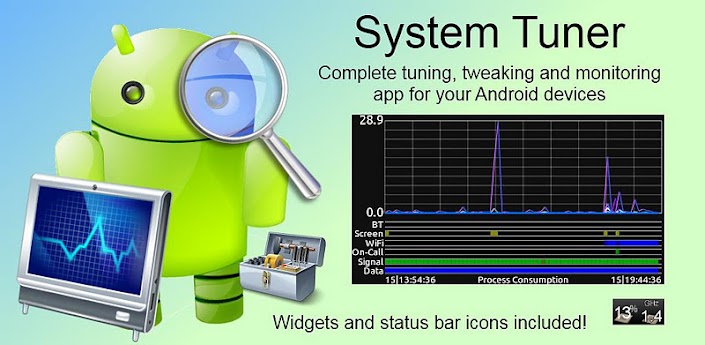
System Tuner Pro

System Tuner Pro


The most complete Android tuner and manager for all your phones and tablets!

The most complete Android system suite: monitor and record all activities, backup and restore *any* applications, extended task killer, CPU SD and memory controls, logcat reader, terminal emulator, widgets and notifications, all in one highly optimized app!

WARNING: Requires WIFI, BT, PHONE and GPS permissions to record phone states. App checked with Privacy Inspector!

By far the lowest consumption monitoring app! Check web-site for app consumption!

You can add shortcuts to your home screen for any of the below features/screens!

Task Manager: (can be set as main UI, see options)
- Filter user/system/kernel processes and exclusion list
- Shows cpu load/frequency, memory/internal/sd usage
- Sort processes by cpu times, start time, memory or by name
- Kill non manually excluded apps automatically
- Shows detailed information about running apps and processes
- Open app system settings
- Read app logcat
- Manually kill running apps

CPU Manager (rooted phones):
- Tweak CPU governor + frequencies during screen-off, on-call
- Tweak CPU voltage (when available on custom Kernel)
- Set CPU settings on boot
- Uses OC/deamon when available and can disable it

Extended Task Killer
- Kill non-excluded apps automatically or manually
- Kill apps during screen-on, screen-off or when widget refreshes
- Manually exclude or include apps
- All system apps are excluded by default
- Manually kill kernel processes (root)
- Display memory and SD details (RAM & internal)

Application Manager without root:
- Backup/restore/uninstall user apps, only APKs are backed-up
- Launch and read app logcat

Application Manager with root:
- Freeze/unfreeze apps
- Remove app from boot
- Backup/restore/uninstall any apps and settings, including system apps
- Launch and read app logcat
- Display application data and cache usage
- Sort application by name, data usage or cache usage
- Move any apps to/from system/user/SD space
- Clear caches or dalvik cache (must reboot after)

Activity Recorder:
- Record (optionally at boot) activities in the background
- Record all apps or all processes
- Record phone states (screen, wifi, bluetooth, gps, mobile data, signal)
- Import Battery Monitor Widget Pro data for detailed analysis!
- Allows analyzing past recordings without limits

Logcat Reader:
- Display log(cat) for all/one process
- Filter logcat by message levels
- Filter logcat based on user-defined text
- Save logcat to file
- Clear existing logcat (root)

Terminal Emulator:
- Keeps history of previously used Linux commands
- Save output to file
- Run pre-existing scripts
- Run commands as Super User (root)

System Tweaker (root):
- Tweak SD cache size to boost performance
- Tweak IO scheduler to boost performance
- App booster on boot (APK alignement + DB cleanup)
- Tweak Android auto-kill memory settings
- Uses Linux init.d script when available

Notifications:
- Show cpu load, frequency, governor, free/used memory (flash/internal/sd)
- Show most information (cpu, memory, internal, SD)
- Optionally shows a configurable graphic time-line
- Provided as external packages, many available for white/black notification backgrounds

Widget:
- Many different widget backgrounds: HTC Sense 2 or 3, Google, Glassy half, ICS or fully transparent.
- Show cpu load, frequency, governor, free/used memory (flash/internal/sd), process count using text or 2 side levels.
- Starts 2 different actions by clicking on the icon or label, including:
. Start/stop recording process activity
. Kill all non-excluded processes
. Refresh
. Start any app activities
. Open settings

KW: advanced task killer system panel backup restore record atk manager analysis logcat cpu memory sdcard sd su root auto kill governor frequency frequencies terminal analyzer apps android system tweak


source
https://play.google.com/store/apps/details?id=ccc71.pmw.pro&hl=en
miror


03 August 2012

SpeedUP

SpeedUP

SpeedUP Like the speed of your phone adjusts.

Use SpeedUP Widgets for easier uses.

Complex and difficult system-related apps are always a lot of settings for beginners If you do not see a lot of use before watching the creation of this app has been decided.
The app is running, just one click of a button, the system will allow you to manage.

After installation, execution of these five, the button will be displayed.

Go: If you press this button to set the phone makes the fastest speed possible.
The original speed: Turn your phone into the base rate will put.
Fastest speed: the fastest, although the transitions to the beautiful animation disappeared beorimeu term will drop.
App Man : Clear the cache, and Manage Apps.
Exit: to exit app button.

This app set to be crafted to target beginners as there is no use of throwing complicated.
In addition, when an app exits of the process to close the current floating things in the proper memory management, so close and exit has the ability.

Proper function to optimize future smartphones and upgrades will be added gradually.

source
https://play.google.com/store/apps/details?id=com.midmee.speedup
mirror

02 August 2012

video effect pro

Videoc*m ill*sion Pro

Vide*cam ill*sion P*o lets you record videos with effects in real-time

** NEW VERSION 1.5 **

"Videoc*m illu*ion P*o" is the first video camera app that lets you record videos with effects in real-time.

Combine filters, effects and masks to create amazing videos without an editing software.

You can even save your favorite combinations of effects and change while you're recording, creating original movies.

*********************

Each purchase motivates us to further improve the app and work on new innovative features. Thanks!


*********************

- Features:

+ 24 filters: customized, mono, color, Chicago, Los Angeles, San Francisco, Arizona, negative, sepia, aqua, old photo, pencil, chalk, emboss, lomo, thermal, ascii art, comic, x-ray, oil, black & white, red channel, green channel & blue channel.

+ 17 effects: blur, sharp, glow, thin, fat, tall, short, horizontal/vertical mirror, pixelization, fisheye, mosaic, light tunnel, pinch, twirl, rough glass & waves.

+ 13 masks: 8mm, rain, tunnel, frame, blackboard, cork board, monitor, bricks, card, negative film, black border, white border & landscape.

+ 5 recording speeds: very slow, slow, normal, fast & very fast.

+ Upload your videos: SNS

+ 3 memories for storing your favorite combos.

+ Change the effects while recording.


- Tips!!!


+ If the recording does not run very smooth try lowering the video resolution (in the Settings)

+ Some filters and effects (e.g. blur) require a device with high processing power to work properly

+ You can also play the recorded videos on a PC/MAC using QuickTime Player, Windows Media Player or VideoLAN

+ Touch the screen to autofocus

+ Press the volume keys to change the selected memory combo

+ Some phones do not support all audio qualities. You can change the recording quality from the Settings

+ To switch between front and rear camera during recording you must select the same resolution on both cameras


source
https://play.google.com/store/apps/details?id=com.androidillusion.videocamillusionpro&feature=more_from_developer#?t=W251bGwsMSwxLDEwMiwiY29tLmFuZHJvaWRpbGx1c2lvbi52aWRlb2NhbWlsbHVzaW9ucHJvIl0.
mirror

22 July 2012

My Beach HD LW

My Beach HD


--Tested, sync with your local time day/night--

Spend a warm summer day relaxing at your own private beach.

My Beach HD is an Editor's Choice on Google Play!

Now with custom signs, custom airplane banners, automatic time of day based on location, Sunset, Dawn, Morning, Evening, Night time, fireworks, and more!

PERMISSIONS: Coarse location permissions are required in order to determine an approximate location for accurate sunrise / sunset times.

From the creators of your favorite live wallpapers, spend a relaxing summer day at your own private beach - everytime you use your device.

Relax in the shade while waves froth at the shore of your very own stretch of secluded beach. Clouds float past a quaint lighthouse in the distance, and a boat gently rocks in the shallows. An airplane with your message drifts through the idylic scene.

Choose the sign message on the beach, or hide the sign altogether - it's all up to you! Watch closely, and you may even see a shark!

Customize every part of the scene, including the waves, sharks, aircraft, signs, umbrella, and more - thousands of possible combinations! You can also hide or show the items in the scene to create your own beach. Or, select one of the preset themes and choose from the 'Private Beach', 'Fireworks at Night', 'Family Outing', 'Independence Day', or 'Shark Sighting' themes.

This wallpaper is true 3D with hand-crafted artwork. Our wallpapers feature silky-smooth animations while conserving your battery life.

Works great with phones, tablets, or any device that supports live wallpapers.

source
https://play.google.com/store/apps/details?id=com.dualboot.apps.beach
mirror


16 July 2012

FBPlus for Facebook

FBPlus for Facebook

Experience the best of Facebook on Android using FBPlus for Android. It's FREE!!

Experience the best of Facebook on Android now using FBPlus for Android: the FREE, featured-charged Facebook client app for Android!

Great Features!
- Notifications
- Toggle fullscreen
- Check-in
- Automatically launch YouTube
- Open links on browser
- Can launch Facebook Messenger and Go!Chat
- Clear cache
- App2SD
- Even more!
* Ads supported, you can hide it by clicking on it!

source
https://play.google.com/store/apps/details?id=com.sociallab.fbplus&feature=search_result#?t=W251bGwsMSwxLDEsImNvbS5zb2NpYWxsYWIuZmJwbHVzIl0
mirror


15 July 2012

Premium Widgets

Premium Widgets
by Piz3ro


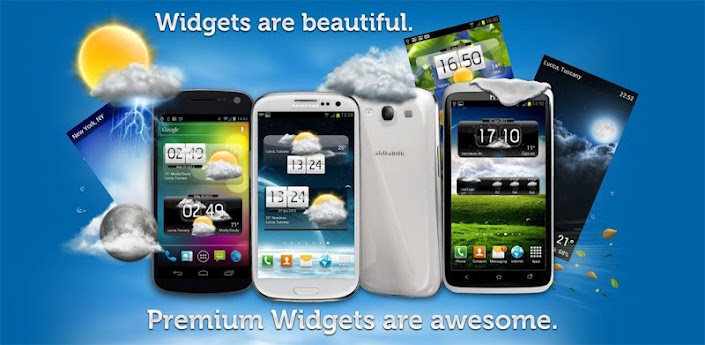
Widgets are beautiful. Premium Widgets are AWESOME!

Incredible high quality Widgets with Weather, skins, HD animations!

Premium Widgets includes a forecast widget, a small clock widget, and a choice of premium clocks, all supporting changeable, additional skins.

If you have comments, or support requests, please write us using the "support" button or via email: pizero@pizero.net We can't reply to reviews ;)

With just a touch, the app enters full screen mode, including a detail page with beautiful weather HD animations. Other features include choice of weather service, location-aware weather, weather by city name, and automatic language detection.

Main Features:

- 3 Different Premium Clocks with weather
- Small Clock and weather
- 3-day weather forecasts
- over 40 fancy weather icons!
- Special effects (rain drops, sunshine, clouds)
- Supports unlimited additional skins
- Full Screen HD weather animations (night & day)
- 2 weather services
- Works with city name or GPS

source
https://play.google.com/store/apps/details?id=com.premiumwidgets
mirror

14 July 2012

Animated Battery Widget

Animated Battery Widget


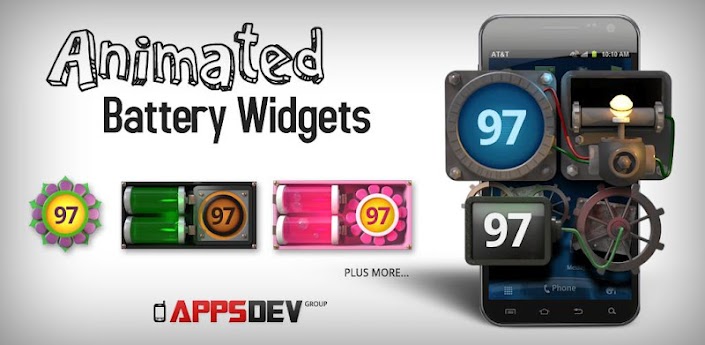
Checking your battery level never looked so good on a Battery Widget!

Sick of searching through hundreds of the same tired looking battery widgets and never finding the one and only battery widget for you?

Your search is over with our collection of EIGHT unique, eye-catching fully animated digital 3D Battery Widgets. Each Battery Widget has it's own design to cater to each individual's battery widget need.

Seriously, still images do not do these incredible looking battery widget pieces of art justice. Check the video below to see the animations of each battery widget in action.

Enhance any home screen with any one of our amazing battery widgets as we simply offer the very best looking battery widget available on Google Play. Every Battery Widget is specially designed through animation to provide the very best possible user experience.

Treat your phone to a really beautiful battery widget, install all of our battery widgets TODAY!

Install any of these amazing looking battery widgets straight onto your homescreen and watch the wheels spin, the batteries bubble, the heart beat and other wonders with eye popping, 3D, animated accuracy.

Each animated battery widget is highly optimized, as to not drain your battery.


source
https://play.google.com/store/apps/details?id=com.animated.batterywidget
mirror

13 July 2012

CUSTOM BROWSER TO GET DIRECT APK


CUSTOM BROWSER TO GET DIRECT APK
TESTES-EASY TO USE

No need to set anything, just open google shop link and press green android upright
nb: only for free app/game
Usefull for :
-Download app/game from another country/region
-Download from AOSP ROM / Non-enabled G-shop ROM
-Download directly with PC
APK downloaded will installable for HH with spec asf :
Adreno
WVGA
4.3Inch


Just in case unable to download/app doesnt viewed correctly(halfscreen/another glitch),
open tools-extension-apk downloader-option :
edit with your own username, password and device ID

To get user ID simply dial *#*#8255#*#* ,
look for row with text "device id:android-xxxxxxxxxxxxxxxxx"


put the xxx(number after android-)(number only) on device ID,
open google shop link and press green android upright


05 July 2012

XTextWidget

XTextWidget

** ver 1.02 : add 5x1 widget size

XTextWidget is a simple homescreen textwidget

*edit text synchronize with preview
*text size and color
*3 style (bold, italic, underline)
*4 widget size (2x1, 3x1, 4x1, 5x1)
*text glowing(=text shadow)

tag : homescreen textwidget 간편입력 텍스트위젯 바탕화면 꾸미기


source
https://play.google.com/store/apps/details?id=com.softrole.xtextwidget&feature=also_installed
mirror